General Information
Webhook is a kind of callback method used to receive payment information. When the status of an invoice changes, a POST request is sent to the url_callback specified either during invoice creation or in the platform settings.
For security reasons, please make sure to verify the sender’s IP address on your server. Our IPs are: 139.59.79.57, 164.92.179.119
Each request includes a Signature in the header, which must be validated to prevent potential attacks. The algorithm for verifying the signature validity can be found here.
Request Example
     {
      type: string, // Payment type: PayIn/PayOut
      uuid: string, // Unique identifier in our system
      order_id: string, // Your identifier provided when creating the order
      lifetime: number | null, // Unix timestamp for the order expiration time
      amount: string, // Fiat amount of the created order
      payment_link: string | null, // Link to the payment terminal
      fact_amount: string | null, // Actual fiat amount processed for the order
      balance_change: string | null, // Amount credited/debited to/from the platform account
      commission: string | null, // Commission amount deducted
      is_test: boolean, // Whether the order is a test order
      status: string, // Current status of the order
      payment_type: string, // Payment method code
      refer: string | null, // Recipient account details
      recipient_name: string | null, // Full name of the recipient
      bank: string | null, // Bank code of the recipient
      currency: string, // Currency code
      additional_data: string | null, // Extra info provided when creating the order
      convert: {
        to_currency: string, // Currency/cryptocurrency code in which the account will be credited/debited
        rate: string | null // Conversion rate
      },
      extra: object | null, // Additional invoice details
      created_at: string, // ISO-8601 date of order creation
    }
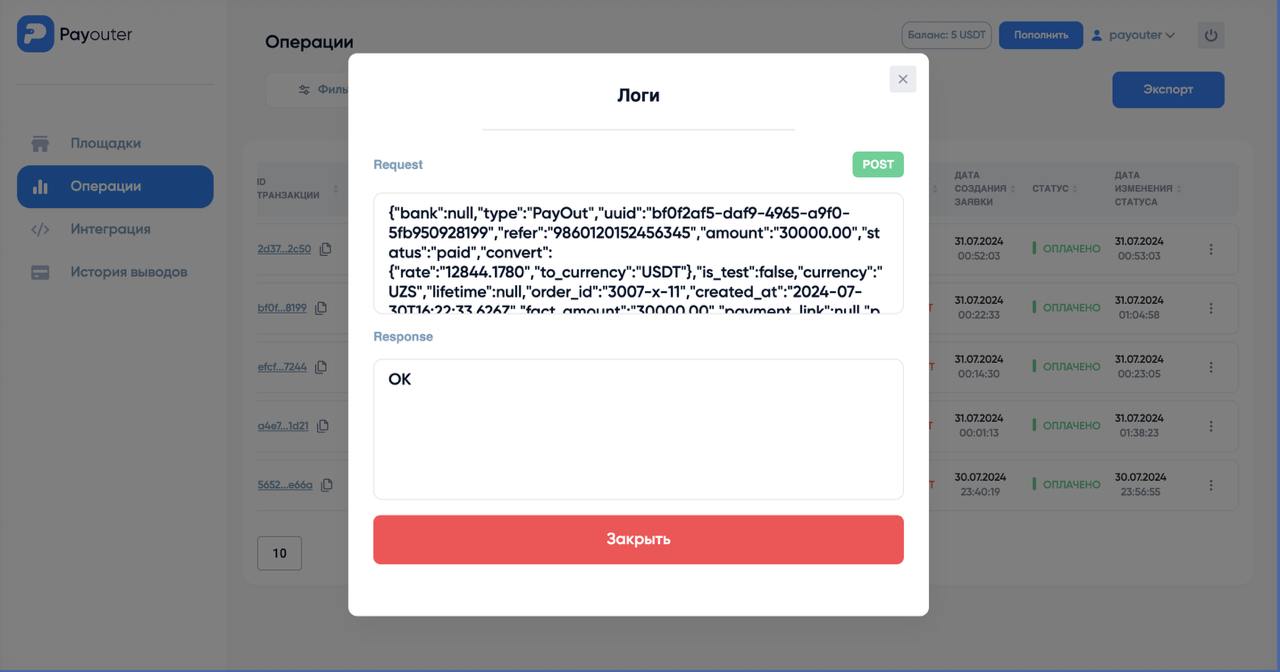
You can view what your server responded when receiving the Webhook and what exact data our service sent in your personal account.
To view this, go to the Operations section, find the order you are interested in, click the Actions button in the far-right column, and select the Logs option from the available list.
Last updated